Tuesday, January 02, 2007
Happy New Year!

Tuesday, October 31, 2006
The Winter is Here!
DualCor PC vaporware of the year... (from JkOnTheRun)
Read JkOnTheRun’s article here. All about why it’s awarded the vaporware of the year award.
Wednesday, October 25, 2006
Alternative way of activating pen text entry
Got a great suggestion for activating the alternative TIP I've blogged about about earlier on. An annonymous comment suggested that the Ink Everywhere panel only should appear if the pen button was pressed when clicking in the field.
This will make it very easy to perform other tasks like copying, pasting and selecting existing text in the field. First I thought that one should have support for gesturing to perform those operations, but that could be a bit too complicated for ordinary users. Any thoughts?
Debug statement in Javascript! Thanks, Julia
Read Julia’s post about her newest discovery in Javascript: The debugger statement! By writing the word debugger in your code, IE will enter the debugger on that line. That was the last time I’ve ever written MyStupidObject.MethodCallThatWillFail() in my code.
Sunday, October 22, 2006
Yesterday's concert
Saturday, October 21, 2006
Speaking of guitar heros...
I'm a guitar hero
Wednesday, October 18, 2006
Cochise is playing live at Cafe Mir on saturday
And I know that it’ll probably be a bit long for you all to travel to Oslo (Norway) to see us. But I just wanted you all to know. You can read more about our band here, and visit our MySpace.com page here. We’re also releasing our new video and ep at the show.
Remember, this is the band I blogged about using my TabletPC when rehearsing :-)
Monday, October 16, 2006
Josh is searching for something else to do
Hope that he isn’t quitting because the Tablet PC market is becomming too small. I belive in the platform and think that a vibrant and good marketplace for third party software is important to ensure growth. So Josh, hope you find something usefull to do, and good luck with finding a new home for TEO.
Sunday, October 15, 2006
What kind of alternative input do we want on the Tablet PC?
(Note to self: Remember not to spend this long untill next time you post.)
If you’ve read my blog the last 6 months, you’ve seen that I have created a small tool for writing ink directly in text fields on the screen. One of the obstacles I’ve met when developing the tool has been to get a consistent way of tracking input fields for all programs in every scenario.
The other major issue I’m having is something I feel I need some help answering. How should an alternative Tablet PC Input Panel work? Jan-Kristian correctly pointed out (when commenting my posting) that there are a lot of considerations to take care of, like how to edit ink etc.
I’ve found out that covering all text fields with a semi-transparent inkable field might work if there are enough functionality for editing text already in the field, and for editing the text you’re currently writing. What I’d like you all to do now, is to comment on this post with your concerns and wishes.
Thanks for your feedback.
Sunday, September 03, 2006
I got a new phone

After a year as a Nokia user, I finally got the opportunity to switch back to a Windows Smartphone. I choose the i-mate SP-5 since it has everything I need and WIFI.
It feels great to surf the net at high speed from my local kaffebrenneriet (coffeeshop in Norway). If anyone has software that they use and find invaluable, please let me know!
It's been a while...
…since you last heard from me. This is mainly because we’ve been rebuilding our new appartement and moving. We’re now well sorted out (still a few boxes to unpack), but the appartement is ready and everybody is quite happy with the way it works out.
I have been busy testing out different ways of building my Ink Everywhere application. The biggest task has been to build it as a text service using the Text Service Framework. From my knowledge, the framework was used to build the current Input Panel, allthough I’m having HUGE problems getting it to notify my program in a consistent way. I’ll post some updates on my findings later.
Tuesday, July 25, 2006
Summertime!
Friday, July 21, 2006
Demonstration of the Ink Everywhere application
If you’d like to test the application, you can download a very, very early demonstration from here:
Extract the contents of the zip file to a directory on your computer, and execute the file Falch.InkOverlay.App.exe. The file sits in the tray icon, and when you select an edit control or another field that can recieve input, the cursor changes to an ink cursor, and you can write away. After ca. 1 sec of not writing, the ink is converted to text and inserted into the input field.
Missing features:
- Windowless controls (controls inside IE, Mozilla etc) wont be inkable.
- The current input scope isn’t tracked.
I’m working on converting the application to a Text Service, which should provide a bit more functionality in the above areas.
Looking forward to your comments. I can be reached by email at chfalch at broadpark period no
Vacation
Ah! Today is my last day at work before my vacation starts! I’ll be leaving for my two week-vacation on sunday. We’re staying in the southern part of Norway in our summer house by the sea.
See you all!
Friday, July 14, 2006
Ink everywhere?
Rob's article about ink in Vista (about the lack of ink everywhere) made me both post and think (actually I've been thinking a lot). I've been working on a little utility for giving me ink everywhere, and wanted to post some pictures about my progress so far. The idea is that the utility would replace the TIP completely, letting you write directly on text fields all over Windows.

The application is still being developed, and important features like detecting the input scope (web, email etc) and integration with windowless controls in IE (on the page itself) is still to be added.
Take a look at these pictures of the application:
Inking in IE: 
Inking in the search field in IE: 
Inking in Explorer: 
Renaming a folder: 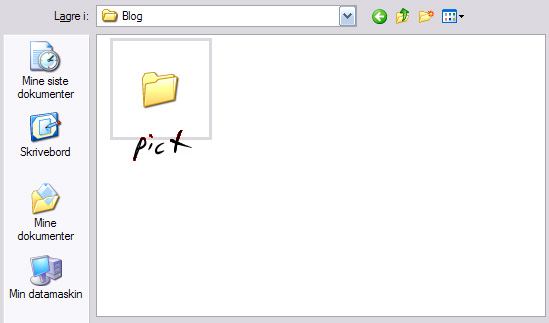
Inking in Outlook: 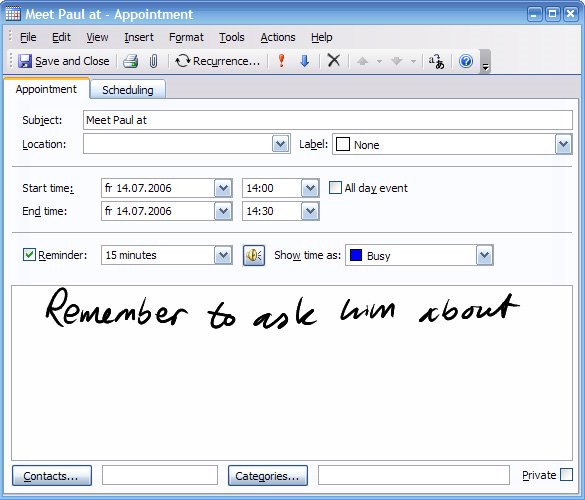
Sunday, July 02, 2006
Rob on Vista and Ink
I just read Rob Rushway’s “Vista and Ink” – article over at GottaBeMobile, and I must say that I think he really hits the nail on its head. Missing the opportunity to add native ink support in Windows Vista controls is how Microsoft can make sure that Tablet PCs will continue to be a technology for the few.
Read the article and pay attention to what Rob says. I agree with him in every word he writes here. Thanks for being so clear about the issue, Rob!
Saturday, July 01, 2006
Power (again...) and laptops..
I was reading (a bit late) the post on “What is new” about power consumption. And since I’m interested in power consumption (ok, I know I’ve said that before!), the following paragraph got me thinking:
“Well, almost. We expect to be able to pick up a PC -- be it a notebook, Tablet PC, or UMPC -- and just be able to use it and not have to even remember that there is a battery in it after three, five, or even seven hours”
When I went home on friday, I just shut the lid of my Tecra M4, put it in my bag and rode home on my bike. After having diner and watching a game of football on tv, I popped the lid and spent a few hours reading blogs and news on the net. Then I closed the lid and went to sleep. Today we got up early to work on hour new appartement and checked a few stores for stuff we needed to buy. When we finally came home this evening I woke up my Tablet again, and I’ve spent the past three-four hours reading blogs, writing and watching Brasil getting beaten by France.
As I write this post, I’m still on batteries, and I haven’t thought too much about how much power I have left or even about the fact that I’m running on batteries (I still have around 1:46 hours left if you’re curious).
I’ll soon close the lid and go to sleep. Forgetting that the Tablet is still running on batteries. But hey, it hibernates when the battery gets low on power, so that’s nothing I need to think about!
UPDATE: It’s sunday morning, and I just wanted to share with you all that this update is also written on batteries. The Tecra started up without a complaint this morning, and I didn’t have to think about batteries at all.
kids and computing time
We've got 5 kids in total. And we've got three computers. Now we're thinking about how we should share the available computing time between the kids. In an ideal world we'd have enough money to buy Tablet Pcs for them all (and maybe a few ultra mobiles as well)
What we think we need is a couple of strong desktop pcs for gaming, and two laptops for surfing and for homework. All our children are very interested in computers, allthough they have different areas of interest. They’re all playing Sims 2, except for the youngest one who is more interested in games where he can play with numbers and letters. They all love writing and changing stuff in their homepages (I’ve tried to get them to blog, but they’re not interested), and they all do their homework using computers. Some of them are more interested than the others, and they all do different things on the computers.
Our problem is that our current computers are old. They’re all more than 4 years old, and allthough I’ve put some work into keeping them up to date, they’re showing signs of their age. So this is the time for a major upgrade!
I’ll get back with more thoughts and ideas on this topic, and I might even ask you for some help or advice, since we’d really love to be able to give our kids the computing time they want.