Friday, June 30, 2006
My Life in Ink
Just got an email from Warner and Rob over at GottaBeMobile.com saying that they just published my contribution to the Life In Ink series. If you’d like to read it, please go here. Thanks for having me over :-)

Friday, June 23, 2006
I wish I was living in the US...
Since I’m both in love with Tablet PCs and with Beetles (I know I haven’t written much about them here), I wish I lived in the US so that I could watch the last episode of Pimp My Ride… (from GottaBeMobile.com). Since it’s all about Beetles and Tablet PCs..
Wednesday, June 21, 2006
Why am I still using a Tablet PC?
My colleage just recieved a new desktop computer. The specs aren’t that important, but goes something like AMD 64 Dual Core, lots of memory (2GB) huge and fast harddrives etc, etc. It boots in no time, makes almost no noise, his development IDEs (Flash/VS2003) boots instantly, programs compile before you can even blink your eyes and he can play Battlefield 2 with superb graphics and speed. He can use whatever keyboard he like and connect any monitor(s) he’d like.
My Tablet PC has got a decent processor (1,7ghz), has got enough RAM (1,5GB) and has a small and efficient harddrive. I’m constantly working on optimizing it’s performance, by lowering the processor voltages, removing unwanted programs and utilities (and even building my own utility to save battery and minimize heat). The screen is small, and the computer is not built for running games (haven’t even tried running Battlefield 2 on it).
We both spend our workdays mostly in the office sitting at our desks. We both try to use tools like del.icio.us and Bloglines to become less dependent on storing our data locally, and we both use our computers as an integrated part of both our private life and in our daily work.
So why do I have a small, slow and hot computer while he has got a brand new fast, cold and large one? Why do I still want to use mine even though his works so much better? It even cost only half of what mine did!
The answer is simple and easy. I won’t trade lying in my sofa and reading my feeds, taking notes in OneNote when in a meeting, taking notes on the plans of our new appartement or being able to develop software whereever I like for his computer.
Just because its not a mobile computer and I cant bring it around with me.
I’ve always been a strong beliver of mobile computing, and seing his new desktop computer and still being convinced that mobile is the way to go makes me feel good!
Thursday, June 15, 2006
Using my Tablet PC in our new appartement
We recently bought a new appartement in the middle of Oslo. Since we have one week with lots of children (five in total) and one week with only two, we needed a solution that took these considerations into account.
We called an architect who helped us draw out a very nice solution that basically gave us one additional bedroom a bigger kitchen and a small room to keep all our computers and other work-related stuff.
So, where do the Tablet PC fit in here? First, we had great use of the PDF Annotator when discussing the drawings. We could sit in our sofa with the Tablet in our laps and draw, annotate and discuss the different solutions.
When the carpenter came to the appartement, I used my Tablet PC to take notes as we walked through each room. Using handwriting was a big help for us, since I could send away what we wrote down right after the meeting.
We also used the Tablet PC to post pictures of different items we’re giving away or selling (a fireplace (!), closets, bathtub). A couple of hours later I had arranged for someone to pick up these (large and heavy) items.
So thanks to my Tablet PC, buying, planning, building, redecorating and selling has been easy as a piece of cake. Hope the rest of the rebuild goes as smooth as we hope!
Tuesday, June 13, 2006
FIFA World Cup 2006: Brazil's coach using a Tablet PC!
Just noticed when watching the World Cup that one of Brazil’s coaches were using a Tablet PC! Didn’t reckognize the model, but you could clearly see that he was using his laptop in tablet mode with a pen.
Another proof that Tablet PCs are becoming more and more popular!
Wednesday, May 31, 2006
New harddrive
I just installed my new Seagate Momentus 100GB 7200RMP harddrive in my Toshiba Tecra M4. There is a noticeable difference in speed when using the computer, especially in disk-intensive applications like video-editing apps etc. The computer boots faster, and applications generally loads quicker. The whole thing just feels quick and snappy.
The upgrade process took me approx. 45 minutes, using Acronis True Image to clone the disk. I chose the Seagate disk after reading this report comparing a few small SATA harddrives. Thanks to these threads on the Tablebuzz.com forums for hints and tips!
Wednesday, May 24, 2006
Homework and Google
Allthough this is not a Tablet PC issue, I just have to share the story with you.
One of my daughters were doing here homework yesterday. Her task was to find the names of birds and plants from small black and white images on a hand-out. The funny thing was that instead of opening her book to find the answers, she turned to Google Images and startet to search. For each image she made a few guesses that she entered in Google Images search. If the resulting images resembled the ones on the hand-out, she trusted that she had found the correct answers and wrote them down. When I checked, almost all of her answers where correct.
I'm loving my new battery-pack
Last night I even left my powerchord at work when I left. Since tomorrow is ascension day I didn’t take the chance to leave it at work tonoght. I will try to stay on batteries to see how long they really last. Right now (after a couple of hours of use) the battery meter tells me that I’ve got approx. 6 hours 30 minutes left. It feels good! Next week I hope I’ll be able to order a new 7200 RPM SATA harddrive to further enhance my Tablet PC experience.
Thursday, May 18, 2006
Edit and Continue in VS 2003
I’m mainly using Visual Studio for my development, allthough I have Visual Studio 2005 installed on my computer. There are two main reasons for doing this. First and foremost, VS2003 is less resource hungry than VS2005. Allthough I can run VS2005 on my Tecra without problems, 99% percent of the time I doesn’t use any of the functionality of the newer version. Secondly, our product is done in .Net 1.1, and we dont have the time at the moment to port it.
One of the new cool features of VS2005 is Edit and Continue: http://weblogs.asp.net/scottgu/archive/2006/05/08/445742.aspx
I was a bit surprised when I saw this, since I’ve been using the functionality in VS2003 for a long time. Here is how we do it:
- Open your project in Visual Studio (2003) and hit Ctrl+Alt+P (Processes)
- Select the aspnet_wp process and press attach. Make sure you select attach to the Common Library Runtime
- Set a breakpoint in your code (this can of course be done before attaching to the process) and access the page from your browser.
- When your application breaks, change something in your code and build the application again.
We use this all the time, and don’t have any problems with working this way. We’re also simultaneously debugging legacy asp-code and javascript in the browser in VS2003., which is helping us finding errors in our application and prevent bugs that we’d otherwise would spend a lot of time debugging.
Google's new Java2Ajax kit
Google has just released it Google Web Toolkit, a set of tools that compiles java source code to browser-compliant Javascript and Html.
Since I’ve been interested in (and used) Ajax, I tried the demos that they have published. I am also running Internet Explorer version 7, and have turned on all the debugging functionality in the browser so that I see all javascript errors when watching a web page.
When trying to run the Dynamic Table Example demo, I got a javascript error saying “object doesn’t support this property or method”. This is a typical javascript error you get when f.ex. trying to access a new window you have opened that doesn’t exist (because it might have been caught by a popup-blocker). The same happened when trying the Kitchen Sink demo. Same reason, the javascript doesn’t check if a new window was really created.
I tried to run the demo in Firefox, and everything went fine. Since I always keep old versions of Internet Explorer aruond, I also tried it in IE 6, and it did work.
Not a very big issue, Google, but you should probably have catched the error in your framework when run in IE7.
New battery for my Tecra M4
Today I finally recieved my new battery for my Toshiba Tecra M4. The battery replaces the dvd unit (which hasn’t been used much) and was easy to install.
Now my battery meter is telling me that I’ve got approximatly 9 hours of battery left. As you might have noticed before, I’ve done a few things to optimize my M4 to make it run cooler and less noisy. I don’t think I’ll have the time to check out how long the batteries will last (I need to get some sleep as well), but I’ll see what happens in the next few days.
Next up is exchanging the built-in 5400 RPM harddrive with a 7200 RPM 100 GB HD to improve boot time and try to further improve the performance of my Toshiba.
Btw, congratulations to Eric Mack who has finally become a YABHTU!
Thursday, May 04, 2006
I broke my table - and my tablet survived
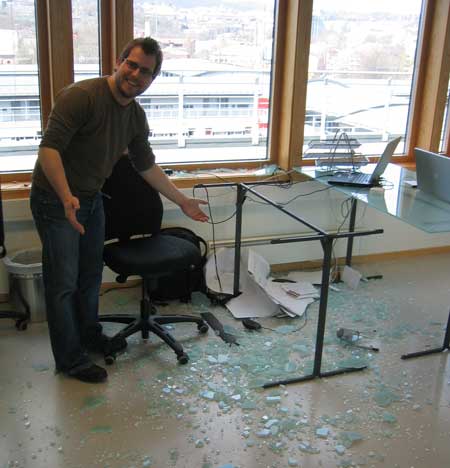
A couple of hours ago I broke my office table. It's a table made of glass (although rather thick glass) and it literaly exploded in front of me. I was standing beside the table, so I wasn't hurt except for a small cut in my left thumb.
On my desk I had my beloved Toshiba Tecra M4 and a nice Powerbook (that I have to validate web pages in Safari). They both fell down, but none of them was hurt. My Tablet PC was caught hanging by the ethernet cable and my eargoogles cable. The only thing that took any damage was my mouse. It's full of scratches and cuts.
And I spent a couple of hours cleaning up. In the picture below I've managed to put the two computers on the nearest table (which is now my new table).
Wednesday, May 03, 2006
Update to the Fan Control Utility
Just wanted to post a note about a very small update to the utility. Thanks to thebithead, I’ve changed the menu item for changing cooling method to “Cooling Method”. Not a big update.. :-)
The tool is updated and downloadable from here.
Programming Fonts
There has been a couple of postings lately about programming fonts. I found a link to this page with a list of recommended programming fonts, but none of the fonts suited me. I think they’re too small. I’ve been using a font called Bitstream Vera Sans Mono that I’ve been very happy with. Today Scott Hanselman blogged about a new font called Consolas, which looks very nice. I’ve posted a picture to show the differences between the Bitstream Vera and the Consolas fonts:

The Consolas font is the font on the right hand side of the picture
Saturday, April 29, 2006
The fan/brightness controll utility
If you'd like to try out the fan and brightness utility, please download it here. The utility has the following features:
* Change brightness in 8 steps
* Change fan speed in three steps
* Remembers settings (put it in your startup directory)
* Remembers settings and switches between them when you change from AC to battery.
Known issues:
* When comming back from standby or hibernate, changing the fan speed wont work before you run the tpsmain.exe program.
The program is supposed to replace the Toshiba Power Management software, and works great together with the Notebook Hardware Control.
* Change brightness in 8 steps
* Change fan speed in three steps
* Remembers settings (put it in your startup directory)
* Remembers settings and switches between them when you change from AC to battery.
Known issues:
* When comming back from standby or hibernate, changing the fan speed wont work before you run the tpsmain.exe program.
The program is supposed to replace the Toshiba Power Management software, and works great together with the Notebook Hardware Control.
Tuesday, April 25, 2006
Do I want to release my little fan/brightness utility?
Warner Crocker is asking me if I’d like to release the little utility I just blogged about how I wrote here, here and here. The answer is yes. There are just a few issues I need to resolve before releasing it into the public (Whenever I return from suspend mode, calling the functions for setting the cooling method wont work, and I need to run tpsmain.exe to reset something. I’m looking into it, and will keep you all posted)
Remember that this tool is supposed to be used together with a utility for controlling the processor/ speed/voltage (I’m using Notebook Hardware Control). My little utility only replaces the code for automatically adjusting the brightness and cooling method when switching between battery and ac operation.
The picture I posted yesterday was of course from running on batteries. When running on AC the “battery optimized” fan speed makes the computer a bit hotter, the temperature lies between 50–60 C, but always closer to 50 than 60.
Monday, April 24, 2006
Results?
You're probably interested in hearing what the results are after running the Fan Utility for while. See the picture to show you that I managed to keep the computer quite cool and running for quite a while with the fan in battery mode and the processor in "slow motion".

Yes, approx three hours of battery time, and a cool computer (around 40C). And all this with Notebook Hardware Control and my own custom fan control utility that also turns down the screen brightness.
Sunday, April 23, 2006
Finishing of the Fan utility
From my last posts you’ve probably read that I managed to find out how to declare and use the APIs for getting and setting the cooling method on my Toshiba Tecra M4.
When I develop applications I always spend some time researching before I start to write the final program. I also throw away the code I write in the research phase so that I can start all over, believing that doing things twice increases the quality of my programs.
The initial design for my utility was a small program that would rest in the tray area letting me change the cooling method from a simple pop up menu. After some thinking I found out that I some additional features that would be nice to have:
- Setting the brightness level of the screen (to save power when running on batteries)
- Add functionality for automatically changing between settings when using batteries and when running from an AC power source
Getting and setting the brightness level was an easy task to accomplish since both the functions GetBrightness and SetBrightness were exported by the Toshiba DLL I was using. The interfaces for these functions were almost the same as for getting/setting the cooling method.
Receiving notifications when switching power sources is easy to do in C#. I remembered reading an article on Codeproject.com about getting notifications about power source changes written by Al Gardner. The article how to use the SystemEvents.PowerModeChanged event and also described how to retrieve information about the current power source using PInvoke to call the Windows API GetSystemPowerStatus.
Creating a Tray Application in C# is simple, all you have to do is create an ordinary WinForms application, set the main form’s ShowInTaskBar property to false and its WindowState property to Minimised.
In addition I added a NotifyIcon component to display an icon in the tray area and a ContextMenu component with the menu options I needed (remember to set the NotifyIcon’s context menu property to point to the context menu you just created).
The rest was just a matter of connecting events to the functionality I had previously discovered, and to write some code for reading/writing the settings for the application to/from the registry.
I’m currently testing the application on my Toshiba Tecra M4, and if all goes well I’ll post a copy of it here on my blog.
Friday, April 21, 2006
Continuing the development of my little utility
Previously I posted an article about the development of a little utility for controlling the fan on my Toshiba Tecra M4. The last thing I wrote was that I had tested the APIs for retrieving the current cooling method. Next up I had to find a way to set the cooling method.
The function SetCoolingMethod seemed to be a good starting point, and since I recently had some success using a pointer to a pointer to an integer (which in c# is declared as ref IntPtr paramname), I tried this with the SetCoolingMethod function as well. I wrote the interfaces in my little test project, and fired it up from within the debugger. This time the program crashed with a null pointer exception. I tried several different ways of declaring the parameter, using integers, pointers to integers and the pointer to a pointer to an integer.
I did some research to see how the Toshiba Power Management software were using the function, and saw that it seemed to send two parameters to the function. I tried to pass two pointer-to-a-pointer-to-an-int parameters to the function, and this time it worked – the fan suddenly stopped spinning like crazy when I fed it with the value 2 as the first parameter!
I now had a way of both getting and setting the cooling method, and was all set to go to build a real program that utilized this knowledge.
Stay tuned for my next post.
Thursday, April 20, 2006
Programming the Lego Mindstorms kit
A couple of years ago (ok, eight years or so), I went to my local toy store and bought the Lego Mindstorms Robotics Invention kit for my kids (they were only three years old at the moment, but the guy behind the counter didn’t know :-). I built quite a few robots, among them were roverbots using infrared lights for prozimity detection and even a dragracer that changes gears when it reached a certain speed. It was fun!
I’ve been waiting for the next version of the Mindstorms kits, and really enjoyed an article I read at the MSDN Coding for Fun site about a .Net SDK for communicating with the RCX. I found the link over at Scott Guthries blog.
Subscribe to:
Posts (Atom)